

Management software for mini hotels and guesthouses of 10–40 rooms
HostBooking ·
Mini hotel management software is where reception, housekeeping and the owner work on one set of data: today's room board, the booking calendar, check-in and check-out, cleaning, payments and the books. For mini hotels and guesthouses of 10–40 rooms, HostBooking does all of it in the browser and on the phone, with a free plan for life and no commission on bookings.
How a mini hotel differs from a homestay
A homestay of 3–5 rooms is often run by the owner alone. A mini hotel of 10–40 rooms has several floors and room types, receptionists working shifts, housekeepers, walk-ins at the desk at midnight and guests booking through Booking.com and Agoda at the same time. A notebook or a shared Excel file starts to leak here: two shifts book the same room, a room is checked out but nobody is told to clean it, the cash at the end of a shift does not add up, and at month end nobody knows which room type made money.
What mini hotel software needs to do
A room board and calendar for many rooms and room types
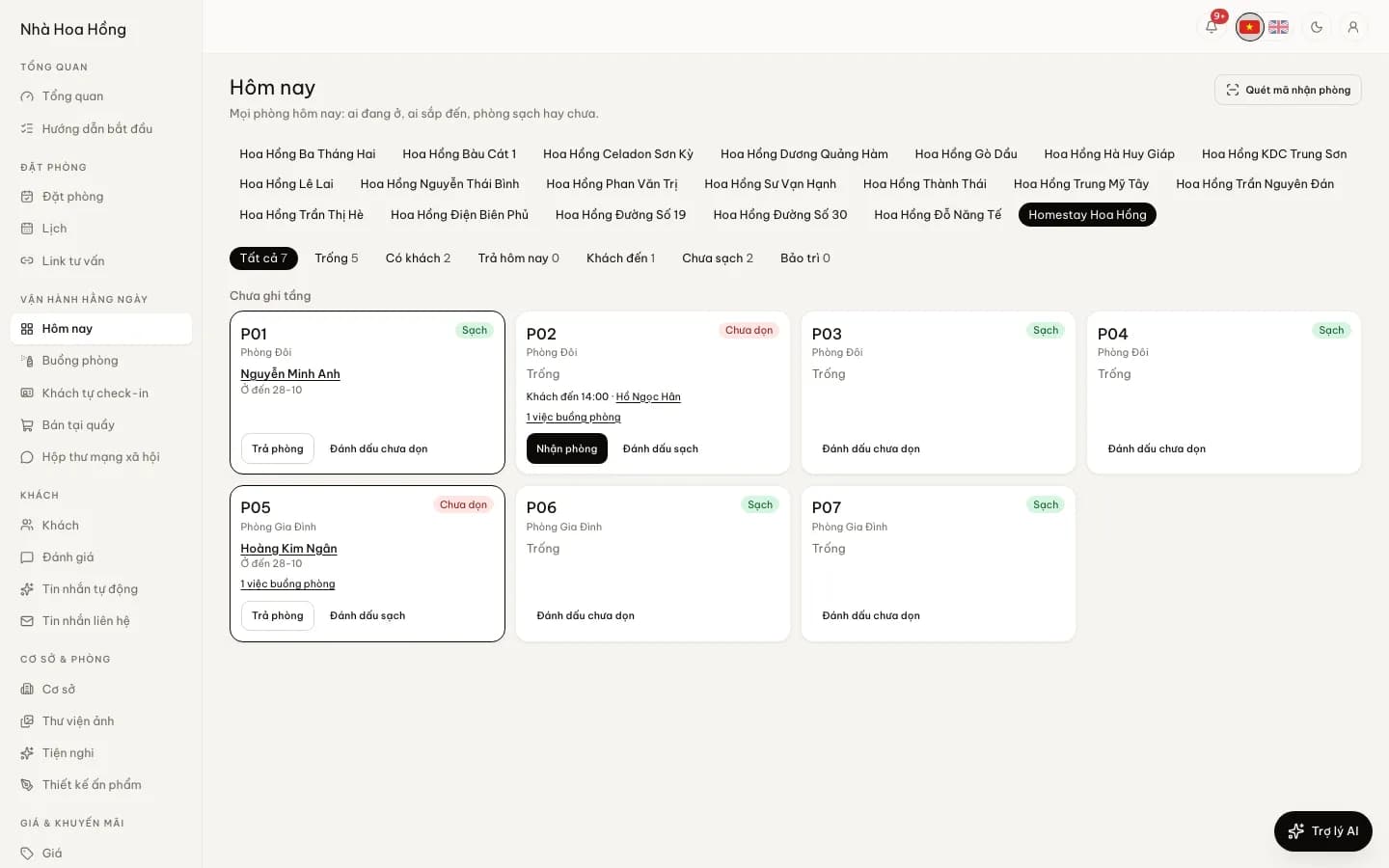
The today's room board shows every room as a card by floor or by area: free, occupied, arriving, waiting for cleaning, under maintenance, with the amount still due. The booking calendar gives each room a row, and each room type a row of nightly rates and rooms left; drag a stay to change room or dates, and two bookings can never sit on one room. A guesthouse that sells by the hour and overnight uses hourly selling on the same calendar.
Front desk: check-in, check-out, extra hours, alerts
At the front desk, staff record walk-ins at an agreed rate, scan the QR code on a booking to check the guest in, add early check-in or late check-out charges by the hour, and print registration cards and receipts. The system warns when a guest is late, a stay is past check-out time, or a room is still dirty with a guest about to arrive. A wrong tap can be undone within 15 minutes.
Housekeeping on the phone
A check-out makes a cleaning task for that room. Housekeeping staff take it on their phone, tick the checklist, take photos and note missing supplies; the room goes back to Clean only when an inspector passes it. Recurring jobs such as checking fire extinguishers or a deep clean are created on the right day by themselves.
Staff, roles, shifts and pay
Roles such as Reception, Housekeeping, Accountant, or roles you name yourself: reception does not see profit and loss, housekeepers do not see guest phone numbers, and manager accounts have two-step sign-in. The point of sale has shift opening and closing with a cash count that shows over or short; drinks and food sold come off stock and can go on the room bill. Staff and payroll counts each person’s tasks, shifts and sales and works out the monthly payroll.
OTA sync so rooms are not sold twice
OTA sync (from the Basic plan) pulls Airbnb, Booking.com and Agoda calendars every 5 minutes over iCal and sends your calendar to them. If a night still gets double-booked, the manager is told at once and moves the guest to a free room in one tap. You can also hold back 1–2 rooms per room type from the OTAs, so your website and the desk can still sell the last ones.
Stay declaration, e-invoices, tax books
Reception scans the QR code on a chip ID card to fill in the guest's details, then exports the stay declaration file in the police residence portal's import format; sending it to the police is still up to you. E-invoices go out through MISA meInvoice or SePay on your own account (from the Professional plan or as an add-on). Books and tax turns what you took in and paid out into a ledger, monthly reports and household-business tax books against the 1 billion VND a year threshold; see household business tax 2026.
Your own booking website and VietQR deposits
Each hotel gets its own booking website: guests see free rooms, book and pay the deposit with a VietQR code that already carries the amount and booking reference. The money goes straight to your bank account; connect SePay and the booking confirms itself when the transfer lands. Returning guests book direct, with no commission to an OTA.
Notebook, Excel or software?
| Job | Notebook, Excel, Zalo | Management software |
|---|---|---|
| Cost to start | 0 VND | A 0 VND plan; paid plans by the month or year |
| Knowing which room is free | Check the book, ask the last shift | Look at the room board, the same for everyone |
| Double bookings between OTAs and the desk | Easy to happen when busy | One calendar, an alert the moment a night clashes |
| Telling housekeeping | A call or a Zalo message | A cleaning task made on check-out |
| Cash at end of shift | Added by hand, hard to see where it went wrong | Closing the shift shows matched, over or short |
| What staff can see | Whoever opens the file sees everything | Each role sees only its own work |
| Tax books at year end | Add it all up again | Built from the bookings and expenses already recorded |
Excel is fine when you run a few rooms by yourself. Once receptionists work shifts and you sell on several channels, software saves the most where nobody has to ask anybody else. Read more: Excel or software.
Choosing mini hotel software: what to ask a vendor
"Top software" lists tend to name the same features. The real question is whether the software runs your actual working day. Ask any vendor, us included:
- How is it priced? Per room, per property or per brand; any percentage on bookings; setup, training and renewal fees.
- Can I try it? A free plan or a trial with every feature, no card needed.
- How does OTA sync work? iCal or a direct connection, how often it updates, and who is told when a room clashes.
- Can staff work on their phones? Do reception and housekeeping need a computer installed at the desk.
- Does it handle the Vietnam-specific jobs? Stay declaration, e-invoices, household-business tax books, QR bank-transfer deposits.
- Whose data is it? Can bookings, guests and books be exported to Excel, and how do I get my data out if I leave.
- When and how is support available? Mini hotels take guests late into the evening, so support hours matter.
To set products side by side criterion by criterion, see choosing free homestay management software.
What HostBooking costs a mini hotel
- A free plan for life: unlimited properties and rooms, up to 50 bookings a month, with the calendar, room board, front desk, housekeeping, point of sale, books and the booking website.
- Paid plans by the month or year, per brand, not per room: from the Basic plan bookings are unlimited and OTA sync is included. See pricing.
- No commission on bookings: guests pay straight into your account.
- A 14-day trial of the full product when you sign up, no card needed.
- Support on Zalo, 8:00–24:00.
A 20-room mini hotel usually goes past 50 bookings a month, so the free plan suits a test run and getting staff used to it; move to a paid plan when the season starts.
Want to click around before signing up? The try-it page opens a sample homestay for 90 minutes, no account needed.
Frequently asked questions
Is there free mini hotel management software?
HostBooking has a free plan for life with unlimited properties and rooms and up to 50 bookings a month. For more bookings or OTA sync, move to a paid plan by the month or year; there is no commission on bookings.
Does it work for a 30-room hotel on several floors?
Yes. Rooms are recorded by floor or area, today's room board shows them that way, and the calendar can be filtered by area. Each room type has its own rates and rooms left.
Do reception and housekeeping need to install anything?
No. The admin runs in the browser on a computer or phone, and there is also the HostBooking app. Each person signs in with their own account and sees only the work their role allows.
Does it prevent double bookings with Booking.com and Agoda?
OTA calendars are pulled every 5 minutes over iCal, so the risk is very small but not zero, because each OTA reads your calendar on its own schedule. When a night clashes, the manager is told at once and moves the guest to a free room in one tap.
I use Excel now. Will I lose my old data?
No. You import bookings and the guest list from an Excel file, and the HostBooking team helps on Zalo if needed.