

What homestay room management software needs to do
HostBooking · · 8 min read
Homestay room management software has to answer three questions every day: which rooms are free, which are occupied, and which need cleaning. That means a room calendar by day and by hour, cleaning tasks created when guests check out, room blocking, calendar sync with OTAs, separate access for each staff member, and something that works on a phone.
How room management differs from booking management
Booking management is about selling: bookings, rates, deposits. Room management is about the actual room: who is in 102 today, whether 201 has been cleaned, why 301 must not be sold while its shower is broken. With a few rooms you can keep it all in your head; add rooms, cleaners or hourly stays and things start to slip. Below are 9 things homestay room management software should do, and how HostBooking’s homestay management software does each one.
1. A room calendar: one row per room, one column per day
This is the screen you open most. At a glance you see which room is free on which night, which bookings have no room yet and which nights are oversold. Moving a guest to another room should be quick, not a matter of deleting and re-creating the booking.
In HostBooking the booking calendar gives each room a row, over several days or one day split by the hour. Drag a booking bar to another room or date, then press Move to confirm. Bookings awaiting a deposit, bookings without a room and oversold nights each have their own colour; three months of the calendar export to Excel.
2. Room status: vacant, occupied, needs cleaning
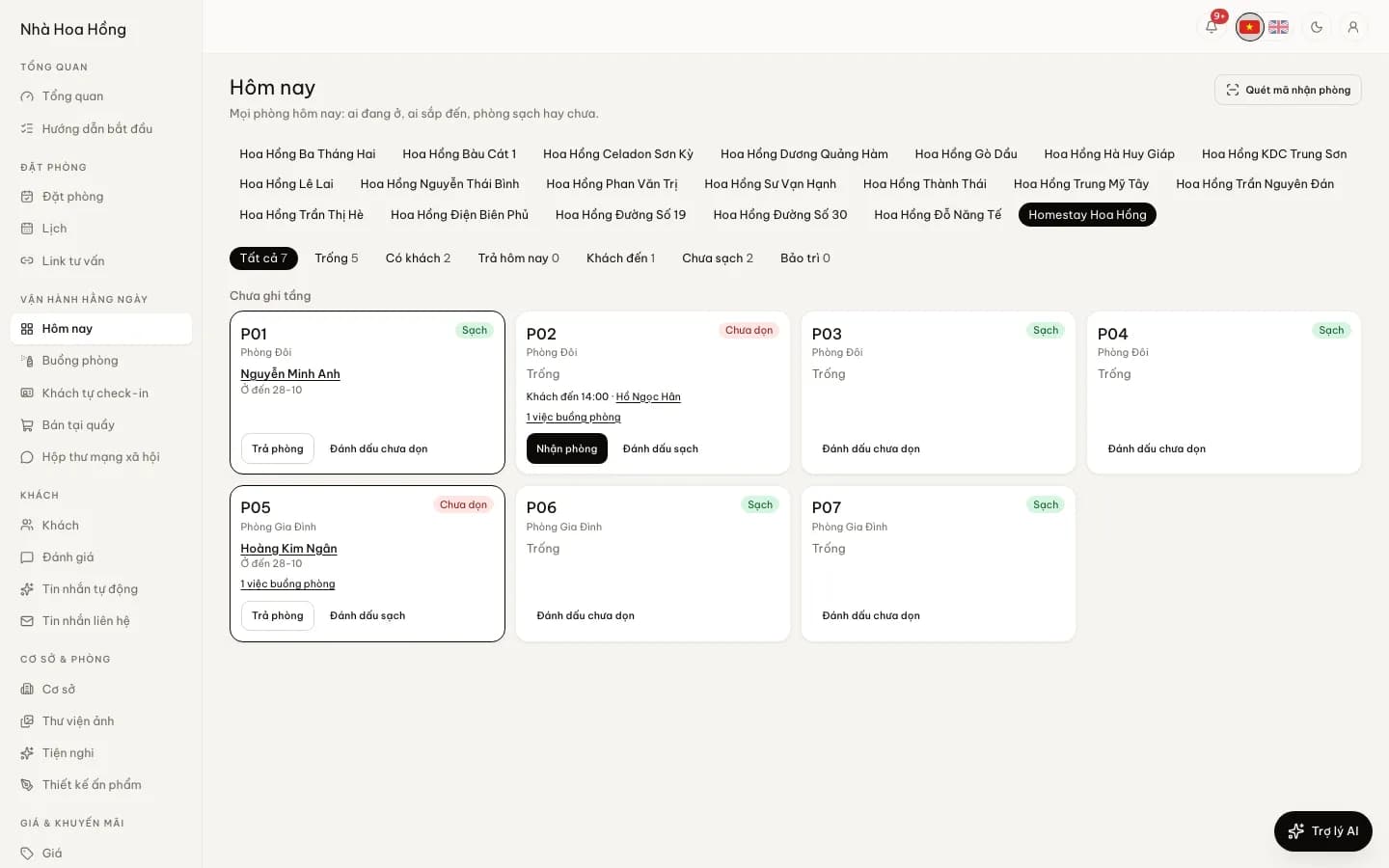
Every room has two statuses at once: guest status (vacant, occupied, checking out today, arriving) and housekeeping status (clean, dirty, maintenance). Reception needs to see both on one screen every morning.
That is HostBooking’s today room board: one card per room, grouped by floor, showing who is staying until when, what time guests arrive, whether the room is clean or dirty, and how much is still due on the booking. Press Check in or Check out on the card; filter quickly for vacant, dirty or maintenance rooms.
3. Cleaning tasks created at check-out
If the cleaner only learns about a check-out when someone sends a Zalo message, rooms get cleaned late. The software should create the cleaning task the moment a guest checks out, with a checklist and an inspection step before the room counts as clean.
In HostBooking housekeeping, each check-out creates a Clean task with the room type’s supplies list. Staff tick each item and take up to 6 photos per task on their phone. You choose which task types must go through Awaiting inspection; the room only turns Clean once it passes. Recurring jobs (watering plants, checking extinguishers) appear on the right day. A sample checklist is in the homestay housekeeping checklist.
4. Hourly and nightly stays in the same room
Many homestays sell by the hour in the daytime and overnight in the evening. The software has to keep a cleaning gap between two stays, or the next guest arrives before the room is ready.
With hourly rentals, each property turns on hourly, overnight, or full-day and long stays. You set the first block’s price, the price of each extra hour and the cleaning minutes held after every booking. More in running an hourly homestay.
5. Several properties on one account
Once you have a second place, you need to see each property separately but run them from one spot. In HostBooking each property has its own rooms, rates and calendar; the calendar and room board are picked per property, and housekeeping tasks filter by property and go to staff assigned to it. Within a large property you can also group rooms into areas such as "Block A" or "Garden house". Each plan’s limits are on the pricing page.
6. Room blocking and maintenance
A room under repair, a room for family, a room held for a regular guest: those nights must not sell on any channel. On HostBooking’s calendar you block one room or a whole room type for a range of dates or hours. A maintenance entry locks exactly the room being fixed and shows in its own colour so the whole team knows.
7. Calendar sync with OTAs over iCal
If you also sell on Airbnb, Booking.com or Agoda, every booking there has to lock the room here, and the other way round. HostBooking’s OTA sync gives each room type (and each room) an .ics link to paste into the OTA, and pulls the OTA calendars every 5 minutes. When the two clash, the bell alerts you straight away, names the bookings involved and lists free rooms to move the guest to. Pulling OTA calendars comes with the Basic plan or as an add-on. How to connect, and the limits of iCal: iCal sync without double bookings.
8. Separate access for each staff member
Cleaners do not need to see revenue; reception does not need to change rates. HostBooking’s roles and permissions start from Front desk, Housekeeping and Accountant templates, then switch each permission on or off. The amount due on a room card is only shown to people allowed to see payments. Two-step verification is available and can be required for the whole brand.
9. Works on a phone
Cleaners and owners rarely sit at a computer. HostBooking runs in the phone’s browser, and there is an Android app for owners and staff: room calendar, bookings, check-in and check-out, housekeeping, new-booking alerts. On an iPhone, add the admin page to the home screen to open it like an app. Push notifications report new bookings, late arrivals, overdue check-outs and rooms still dirty shortly before a guest arrives.
Notebook, Excel or software?
| Job | Notebook | Excel / Google Sheets | Room management software |
|---|---|---|---|
| See which rooms are free | Flip through pages | Scan line by line | Look at the calendar or room board |
| Avoid double bookings | Rely on memory | Easy to clash when several people edit | Blocked by the system |
| Cleaning status | Zalo messages | A column updated by hand | Changes at check-out and when cleaning is done |
| Assign cleaning | Calls and messages | Not really | Tasks created automatically, with checklist and photos |
| Hourly stays | Very easy to get wrong | Complicated formulas | Keeps the cleaning gap between stays |
| Sync with OTAs | No | No | Two-way iCal, alerts on clashes |
| Staff access | No | Share the whole file | Permissions by role |
| Cost | Almost nothing | Almost nothing | A free plan, paid plans by the month |
A notebook or Excel is enough when you have a few rooms, one person taking bookings and only nightly stays. The signs it is time to switch are in running a homestay on Excel or on software.
How to start
- Create the property, room types and each room (room number, floor, area). For several properties, use the Excel template.
- Enter upcoming bookings by hand or through data import, so the calendar shows which rooms are already taken.
- Connect the OTA calendars if you sell on Airbnb, Booking.com or Agoda.
- Add staff with suitable roles and turn on notifications on each person’s phone.
The Free plan is enough to try it on a real homestay; see pricing for each plan’s limits.
Frequently asked questions
How is room management software different from booking software?
Booking management handles bookings, rates and deposits. Room management handles the actual room: whether it is free, occupied, needs cleaning or is under maintenance. HostBooking does both on the same calendar.
Do cleaners need an account?
To receive and tick off cleaning tasks, yes, with a role that only has housekeeping access. The wall task board opens from a secret link, needs no sign-in and shows no guest details.
Can it handle rooms sold by the hour?
Yes. Each property can sell by the hour, overnight or by the day; the system holds the cleaning minutes you set after every booking, so the next guest does not arrive before the room is ready.
Is there a mobile app?
There is an Android app for owners and staff, downloadable from the app page. On iPhone and computers, open the admin page in the browser and add it to the home screen.
I sell on Airbnb and Booking. Will rooms be double booked?
Connect the calendars over iCal: an OTA booking locks the room in HostBooking and the other way round. iCal always lags, because each OTA decides how often it re-reads your link, so when a clash happens HostBooking alerts you at once and lists free rooms to move the guest to.