

How to choose homestay management software: the features you need
HostBooking ·
Choosing homestay management software starts with the jobs you repeat every day: the room calendar, bookings, deposits, staff and revenue. This page lists each feature you need and how [HostBooking homestay management software](/) handles it. HostBooking runs in the browser, with a room calendar, bookings, QR bank-transfer deposits, staff and revenue reports. Every homestay gets its own booking website so guests can book themselves. HostBooking takes no percentage of your bookings: you pay a monthly plan, and guests pay straight into your bank account.
What should homestay management software do?
A small homestay is often run from a notebook, Zalo (Vietnam’s main messaging app) and a Google Sheet. That works with 2–3 rooms, but gets messy once you add rooms, staff or hourly guests. Good software takes care of the jobs that repeat every day:
- One room calendar: see at a glance which rooms are free and which hours are taken, with no double bookings.
- Bookings that come in on their own: guests choose a room and time, book and pay the deposit, with no back-and-forth messages.
- Clear deposits: know which bookings have paid, which have not, and which account the money went to.
- Instant alerts: you hear about new bookings, cancellations and guests about to arrive.
- Staff with their own access: reception sees bookings, the owner sees revenue.
- Numbers to decide with: revenue, occupancy, where guests come from.
How HostBooking runs a homestay
Room calendar and bookings
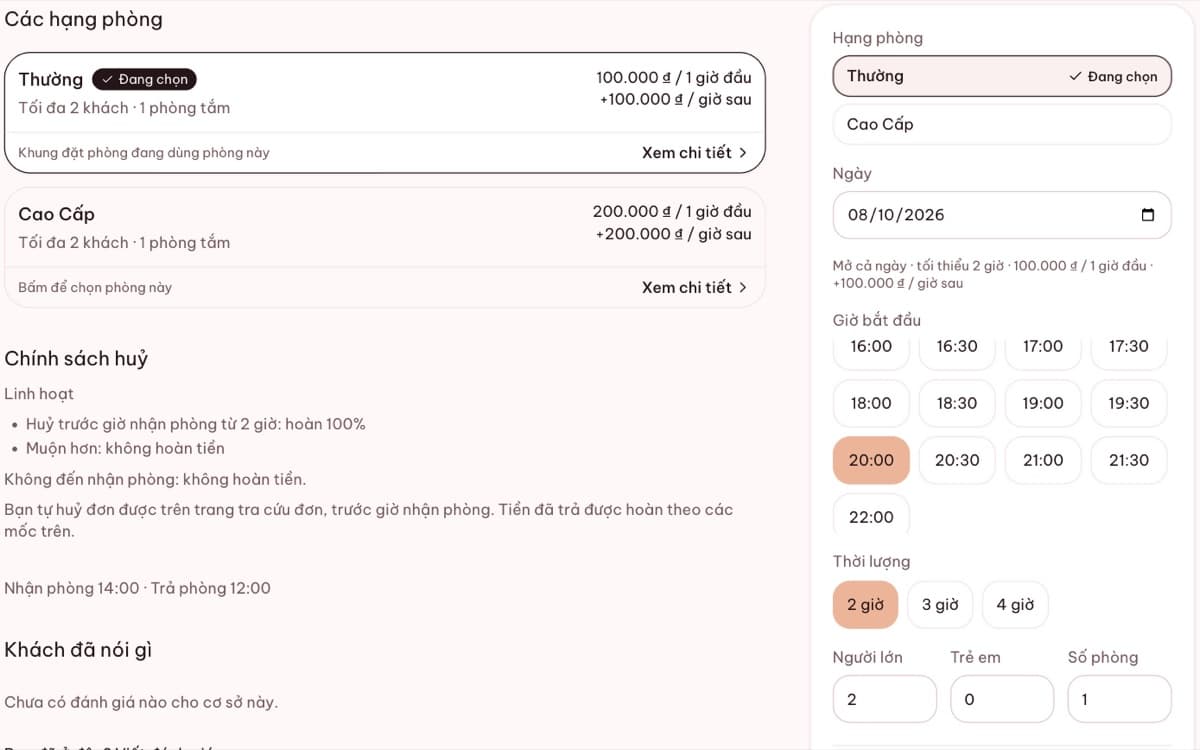
Every booking, whether the guest booked on your website or you typed it in after a phone call, sits on one calendar. It shows days or hours, per room and per property. Once a time slot is taken, the booking page hides it, so two guests can never hold the same room.
Rent by the hour, overnight or by the day
Each room type can sell by the hour, overnight, by the day or a mix. Prices are worked out for you: first hour, each extra hour, weekend rates, holiday rates. See hourly booking software.
QR bank-transfer deposits
When guests book, they see a VietQR code (Vietnam’s standard bank-transfer QR) with the amount and transfer reference already filled in. The money goes straight into your bank account, with no middleman. You tap "Deposit received" when it arrives, or turn on automatic confirmation. Details in taking QR bank-transfer deposits.
Staff and several properties
Add staff with their own roles, for example manager of one property, or reception that only sees bookings. The Professional plan runs several properties on one account, each with its own rooms, rates and calendar.
Reports and an AI assistant
The Reports page shows revenue, occupancy, average rate per night and booking sources. On plans with AI you can also ask the assistant in plain words, such as "what is revenue this month?" or "which rooms are free tonight?". The assistant reads only your own homestay’s data and shows where each number comes from so you can check it.
Compared with Excel or Zalo
| Job | Excel / Zalo | HostBooking |
|---|---|---|
| Check free rooms | Open the file, scan line by line | Look at the calendar; guests see it too |
| Take bookings | Message back and forth, easy to miss one | Guests book themselves 24/7 |
| Double bookings | Easy when several people edit | Blocked by the system |
| Deposits | Match bank statements by hand | QR with the exact amount, marked on the booking |
| Reports | Build your own formulas | Ready by day, month and property |
Read more: running a homestay on Excel or on software.
Cost
There is a free plan for life with unlimited properties and rooms (50 bookings a month), and paid plans billed monthly or yearly. HostBooking takes no percentage of any booking. See pricing for each plan’s limits.
Frequently asked questions
Is HostBooking homestay management software free?
There is a free plan for life with unlimited properties and rooms and 50 bookings a month. Signing up gives a 14-day trial of the full product, no card needed. When the trial ends, your account moves to the free plan and keeps all its data.
Do I need to install anything?
No. HostBooking runs in the browser, on a computer or a phone. Guests do not need to install an app to book either.
What about the guests I get through Booking.com and Agoda?
You keep taking guests from the OTAs as usual and put their bookings on the calendar so rooms are never double booked. Your own website lets returning guests book direct with you, with no commission.
Is guest data safe?
Each homestay’s data is kept separate at the database level. Guest details are visible only to you and the staff you give access to.