

← All how-to videosMore on this topic
Today’s board: arrivals, departures, rooms to clean
One screen for the front desk: who arrives, who is in, who leaves today, and each room’s cleaning state.
Narrated in Vietnamese, with Vietnamese captions.
About Today room board →In this video
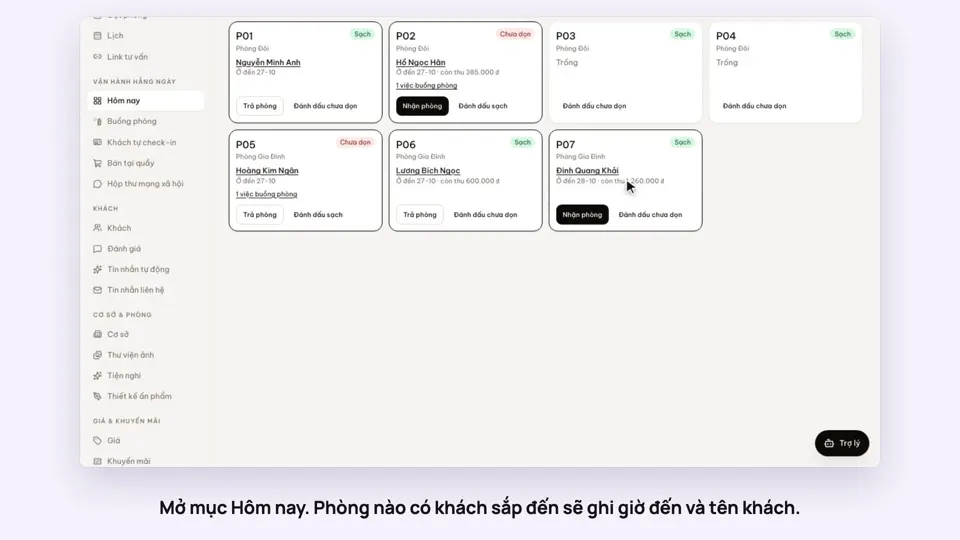
- The Today section is the front desk screen: each tile is a room, grouped by floor.
- Each room shows who is staying, what time they check out, how much is still unpaid and whether the room is clean.
- Filter quickly: rooms with a guest leaving today, guests arriving soon, or rooms not yet cleaned.
- When a guest arrives at the desk, click Check in right on that room’s tile.
- When a room is cleaned, mark it clean and the whole team sees it straight away.
 0:43Share a view-only calendar, recolour it, see a room’s monthToday & housekeeping
 0:31Block a room for repairs or a friendBookingsToday & housekeeping
 0:34Check guests in and outBookingsToday & housekeeping
 0:36Sync iCal calendars room by roomToday & housekeeping
 0:29Group rooms by areaToday & housekeeping
 0:36Dashboard: 30 nights of occupancy, arrivals and departuresToday & housekeeping